I have a beagle board, it is really fun to play with it. Now the team released a beaglebone, with build-in ethernet, smaller footprint and IO expansion spaces. Though it is small, a Linux OS can be run on it and even cooler, you can connect to it with your browser and control the IO with Javascript! It is really a good starter kit for beginner!
Check out the website here: http://beagleboard.org/bone
Showing posts with label beagleboard. Show all posts
Showing posts with label beagleboard. Show all posts
Thursday, November 3, 2011


Monday, May 10, 2010
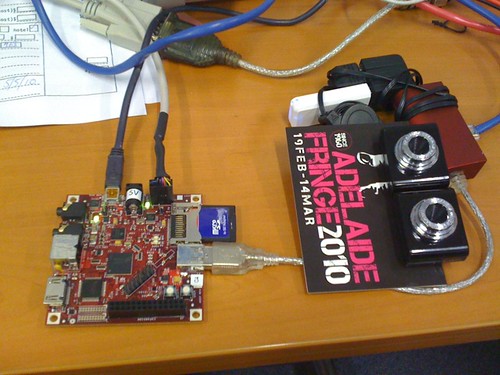
Stereo Vision on BeagleBoard.
I tried to use the face tracker in openCV on the beagleboard few months ago, but what I really want to do is using stereo vision on the beagleboard, so I can build a robust robot. I am glad that someone tried before me, so I can learn from his experience:) Nick did some experiments on using stereo vision on beagleboard, check it out:

Nick's URL:
http://whatnicklife.blogspot.com/2010/05/beagle-has-2-eyes-opencv-stereo-on.html
Nick's URL:
http://whatnicklife.blogspot.com/2010/05/beagle-has-2-eyes-opencv-stereo-on.html
Thursday, December 3, 2009
Android on Beagleboard.

Recently, Moto announced the Android Media Platform (based on TI OMAP processor) which you can get started with Android. I looks good to me too, but no information on the pricing yet.
I tried the porting of Android on OMAP, which is called "rowboat" project. I followed the instructions there, you can build from scratch or simply download the binaries there. It works very well on my BeagleBoard. If you are interested in running Android on your beagleboard, I strongly recommend you to check this out:
Android for OMAP3 (rowboat)
A cool video showing the Android running on BeagleBoard:
Tuesday, June 23, 2009
Getting Started with BeagleBoard, with Angstrom distribution
Beagleboard is very small but powerful, with the nice integrated Anstrom distribution, you can turn this little board to a desktop like environment! I followed the beginner guide "HowToGetAngStromRunning" and successfully make it works within 30 minutes!
The good things are that all the drivers are pre-built, so whatever I plugged a USB ethernet, or a USB mouse or keyboard, all works like a charm.
Let's check out some screenshots:

1. Firefox running, I copied my Chinese TTF from my Desktop Linux to it, so it can display Chinese as well.

2. WORD processor & Game.

3. Native ARM development, with the GNU toolchains built-in the distribution, you can work in a complete ARM development environment.
Link:
http://elinux.org/BeagleBoard
The good things are that all the drivers are pre-built, so whatever I plugged a USB ethernet, or a USB mouse or keyboard, all works like a charm.
Let's check out some screenshots:

1. Firefox running, I copied my Chinese TTF from my Desktop Linux to it, so it can display Chinese as well.

2. WORD processor & Game.

3. Native ARM development, with the GNU toolchains built-in the distribution, you can work in a complete ARM development environment.
Link:
http://elinux.org/BeagleBoard
Subscribe to:
Posts (Atom)