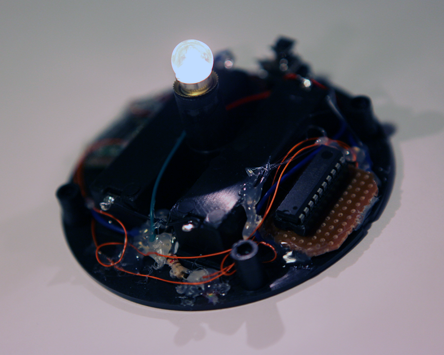
kaas has made a very simple project called "2 hour Love project", it is a very simple circuit, no software programming at all. Recently, I found out that Hesit8 has improved this project and make a very cool : AVR Love Project! With the help of Attiny2313, he made some cool led effects. Let's see the demo video:
also the project link here:
http://hesit8.wordpress.com/2010/09/23/avr-love-projects/
Showing posts with label avr. Show all posts
Showing posts with label avr. Show all posts
Thursday, September 23, 2010


Monday, September 13, 2010
Android controlled wireless lamp.
Previously, we discussed about bluetooth module used with Android Nexus One, so today, we would like to present our latest project here "Android controlled wireless lamp", We want to do somethings meaningful with the bluetooth module with Android, so we modify a small lamp and adding the bluetooth connectivity to it.
Sometimes, we may put the phone in bedroom, and we will not know someone is calling. With the bluetooth connectivity, it can communicate with your Android phone at least 10 meters or above. You can put the lamp near your TV or anywhere you stay. Also, you can use Android as a remote control to turn on/off the lamp (or any devices).
Hareware: AVRtiny2313, Bluetooth module, lamp

Ready to go:
Video Demo:
Sometimes, we may put the phone in bedroom, and we will not know someone is calling. With the bluetooth connectivity, it can communicate with your Android phone at least 10 meters or above. You can put the lamp near your TV or anywhere you stay. Also, you can use Android as a remote control to turn on/off the lamp (or any devices).
Hareware: AVRtiny2313, Bluetooth module, lamp
Ready to go:
Video Demo:
Monday, January 4, 2010
Programming AVR tiny2313 with STK500.
I used AVR tiny13 for most of my small projects, now I am going to move on with tiny2313 because of more IOs available and also with UART support.
Kaasxxx wrote about programming AVR tiny13 with STK500, so I decide to write my small introduction on programming tiny2313.
Step 1. Connect the 6-wire ISP cable between ISP6PIN and SPROG3.

Step 2. Put the tiny2313 on the Socket SCKT3300D3.

I also connected pin PB0 to pin LED0 (as you see the green/yellow cable) to test my led blink test program on tiny2313.
I prepared for a led blink sample code with Makefile (avr-gcc and avrdude targeted for tiny2313), you should modify the download serial port name in the Makefile for your machine. You can download here: avr_tiny2313_led.tar.gz
Hope you found useful;)
Kaasxxx wrote about programming AVR tiny13 with STK500, so I decide to write my small introduction on programming tiny2313.
Step 1. Connect the 6-wire ISP cable between ISP6PIN and SPROG3.

Step 2. Put the tiny2313 on the Socket SCKT3300D3.

I also connected pin PB0 to pin LED0 (as you see the green/yellow cable) to test my led blink test program on tiny2313.
I prepared for a led blink sample code with Makefile (avr-gcc and avrdude targeted for tiny2313), you should modify the download serial port name in the Makefile for your machine. You can download here: avr_tiny2313_led.tar.gz
Hope you found useful;)
Friday, January 1, 2010
AVR development on Ubuntu Linux.
I used Mac OS X for all my AVR developments so far.I got my netbook running Ubuntu and I want to use it for AVR developement recently. It is easier to get all the tools installed as I thought. The following commands do the magic:
sudo apt-get install gcc-avr
sudo apt-get install avr-libc
sudo apt-get install avrdude
Worked like a charm:)
sudo apt-get install gcc-avr
sudo apt-get install avr-libc
sudo apt-get install avrdude
Worked like a charm:)
Sunday, December 6, 2009
Connecting Camera to your AVR (MCU)

The uCam (microCAM) produced by 4D systems, is the easiest to connect to your AVR or MCU. It is a camera module with JPEG compressor ASIC integrated, you can grep the JPEG data (image frame) via UART interface which available on most of the MCU. The simplicity of interfacing comes with a price:) it costs US$59. Let see the demo here:
Link:
http://www.4dsystems.com.au/prod.php?id=75
Wednesday, September 30, 2009
AVR Embedded Microcontroller Resources.

Just found out a good site for AVR resources, it includes the following sections which may help on your AVR studies:
1) Basic Information
Link to sites cover most of the basic ideas of AVR MCU.
2) Project Ideas
Link to sites for some cool AVR projects.
3) Development tools.
Get your hand dirty, links to the development tools for AVR.
4) OS Kernel
Some cool RTOS links for AVR.
Link:
http://www.ipass.net/hammill/newavr.htm
Friday, July 24, 2009
AVR Touchscreen interfacing.

Sparkfun.com made an AVR based USB Touchscreen Mouse, basically you attach a resistive touch screen to AVR IO pins and get the x and y coordinates with some calculations, after that sent to your computer using serial or usb port. So you will have a touch screen mouse or drawing pad. They used a PSP touch screen which also ready @ sparkfun store, the tutorial is very detail and clear, codes are included too, thanks guy who sent in.
Check out the demo video:
USB AVR Touch Screen from Sparkfun on Vimeo.
Tutorial:
The AVR based USB Touchscreen Mouse
Thursday, June 11, 2009
AVR Serial (UART) communication get explained.
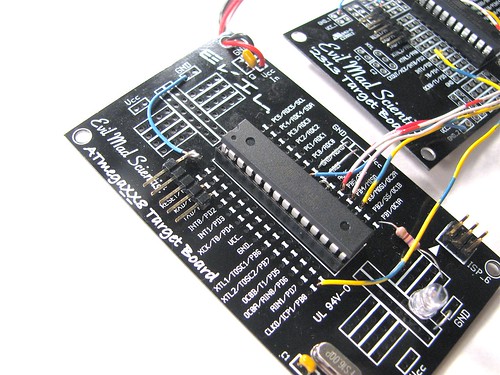
Evil Mad Scientist Labs presents an in-depth tutorial on AVR serial communication, provided with ATiny2313 and ATmega example codes. Another must-read article from them!
Link:
Basics: Serial communication with AVR microcontrollers
Sunday, May 31, 2009
Cheap wireless solution for AVR/MCU projects.

The nRF24L01+ is a 2.4GHZ RF Transceiver produced by NORDIC semiconductor, it is a very small , powerful and low-power solution for your home project. I am studying how to interface with my AVR MCUs. Luckily, I found out someone has a driver written for AVR, it is well-documented and easy to follow. Check out the link here: http://www.tinkerer.eu/AVRLib/nRF24L01. Basically, you need to have a SPI interface, so most of the AVR MCUs have! so How far can it goes? Sparkfun did a test, around 360feet LOS.
Saturday, April 18, 2009
Tiny Robot Kit Avaliable. (aka AVRKitCAR)
The Phenonstream is selling a tiny robot kit for $85, includes everything from motor, MCU, wheels, and building plates.


it looks quite solid to me. The SD card slot is actually an I2C interface to the Atmel AVRtiny84 host MCU, I am not sure how to program the AVRtiny84 with this SD card like PCB on your PC or Mac easily, may be more tutorials needed to be presented on its website. But anyway, if you are a hardcore engineer, you can just buy this kit and get the ISP pins out of it and program it yourself with your Atmel ISP programmer. Have fun!
Check out the kit:
http://www.phenostream.com/products/KIT_01.aspx
it looks quite solid to me. The SD card slot is actually an I2C interface to the Atmel AVRtiny84 host MCU, I am not sure how to program the AVRtiny84 with this SD card like PCB on your PC or Mac easily, may be more tutorials needed to be presented on its website. But anyway, if you are a hardcore engineer, you can just buy this kit and get the ISP pins out of it and program it yourself with your Atmel ISP programmer. Have fun!
Check out the kit:
http://www.phenostream.com/products/KIT_01.aspx
Sunday, April 5, 2009
LED Driving without resistor.
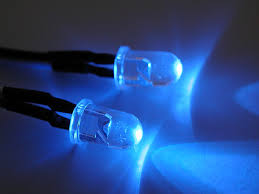
Tinkerlog just posted an in-depth study on what situration that the current-limiting resistor can be omitted when driving a led. If you want to save PCB space or just lazy like me, not going to add a current-limiting resistor between your MCU output and LED, you should defintely to have a look on his study!
Link:
http://tinkerlog.com/2009/04/05/driving-an-led-with-or-without-a-resistor/
Tuesday, March 24, 2009
XGameStation - AVR 8-bit Development board - Create your own console game!
XGamestation sent me a link about their new AVR 8-bit Developement kit, XGS AVR 8-Bit Development System. After reading the details, I am impressed. The DIY video console game is nice, and showed me how the AVR 8-bit processor can be optimized to do complicated image processing(So far, I only use AVR for small project!). Let's take a look on the video demo first:

The kit includes:
1) XGS AVR 8-bit development board (VGA output, NTSC/PAL output, game controller(NES) port, PS/2 port, SD card slot, power regulator, serial port, audio output etc.)
2) AVR USB MKII ISP programmer
3) one NES clone gamepad
4) 1G MicroSD
5) DVD (includes all the codes, manuals to kick start)
One thing want to emphasis is the Ebook "Inside the XGS AVR 8-Bit" come with the kit, it is a comprehensive guide of programming AVR and also game console programming. If you are very interested on how the game console works, it is a good book for you too.
See? It is a complete kit for game console programming, it costs $139.95, you can buy it here: http://www.xgamestation.com/view_product.php?id=46&mid_img_index=0
Let me know if you make some cool games! I am pretty busy recently, otherwise, I really want to have a try! and write you an in-depth review on it!
Any cool site or kit to suggest to me? Just fill out the form here: Suggest to me I would be happy to take a look!
The kit includes:
1) XGS AVR 8-bit development board (VGA output, NTSC/PAL output, game controller(NES) port, PS/2 port, SD card slot, power regulator, serial port, audio output etc.)
2) AVR USB MKII ISP programmer
3) one NES clone gamepad
4) 1G MicroSD
5) DVD (includes all the codes, manuals to kick start)
One thing want to emphasis is the Ebook "Inside the XGS AVR 8-Bit" come with the kit, it is a comprehensive guide of programming AVR and also game console programming. If you are very interested on how the game console works, it is a good book for you too.
See? It is a complete kit for game console programming, it costs $139.95, you can buy it here: http://www.xgamestation.com/view_product.php?id=46&mid_img_index=0
Let me know if you make some cool games! I am pretty busy recently, otherwise, I really want to have a try! and write you an in-depth review on it!
Any cool site or kit to suggest to me? Just fill out the form here: Suggest to me I would be happy to take a look!
Saturday, March 14, 2009
Digital Compass with AVR (Arduino)

Digital compass is a magnetic sensor which gives you the heading direction, which may be useful for your robotic projects. I have tried it with my HTC G1, which has the digital compass built-in, and working very well with Google map.
One common digital compass sensor available on the market is Honeywell's HMC6352 which is a fully integrated sensor, it is very easy to use. You can use I2C to connect to your microprocessor, by sending a simple character 'A' to the sensor, it will return you the heading information. Near Future Laboratory has an example on using arduino and HMC6352, source codes are also available. Please check it out on the links below!
Links:
Honeywell's HMC6352 2-Axis
Near Future Laboratory - Finding The Way - HMC6352 Digital Compass
Tuesday, March 3, 2009
New AVRtiny43U (Ultra low-voltage), can even run @0.7V
Atmel is working hard on low voltage MCU, and the latest one is ATtiny43U, it is designed for application running battery. The key feature is the built-in integrated boost convertor to geneate stable 3.0V from voltage source as low as 0.7V. For more informaton: please check out the product web site: AVRtiny43U,
Also, be sure to check out the AVR TV demostration on ATtiny43U:
"Ultra low-voltage AVR with Internal Boost Regulator"
Also, be sure to check out the AVR TV demostration on ATtiny43U:
"Ultra low-voltage AVR with Internal Boost Regulator"
Monday, February 2, 2009
LED flower vase supplementary note.

Some of the viewers requested for the source codes and also the circuit diagram, kaas is no longer working on his blog, so let me write you all a supplementary note.
Of course, I don't own a circuit diagram, but I can draw you all a block diagram:

Remember, it is only a draft block diagram, power and resistors are not shown in this diagram, please try to add your own:)
The complete working source codes: Download Now (Only tested compilation on Mac OS X with avr-gcc).
Send me your led vase's photo if you successfully made one:) Have fun!
Sunday, January 4, 2009
How Microcontroller BootLoader works?

Brumbarchris wrote an interesting artcile about MCU bootloader, it is time to read some techincal stuffs.
Read it
Tuesday, December 30, 2008
AVR in sleep mode. (power saving mode)
I used AVR tiny13 for small applications very often, and mostly it is powered by only small battery. It is easy to put the AVR MCU to power save mode with avrlib, just few lines of code would do. To wake up the AVR MCU, you should setup interrupt before falling into sleep mode, either pin change interrupt or external INT0.
Here is my sample code (waked up by pin change interrupt)
I only measured once I finished the demo circuit, and it should use around 10 times less power when AVR is in sleep mode. Have fun.
Here is my sample code (waked up by pin change interrupt)
//do nothing in interrupt func.
ISR(PCINT0_vect){
        cli();
}


//main code:


//setup interrupt
    GIMSK |= 1<< PCIE;
    PCMSK |= 1<< PCINT0;

    on_bulb(); //turn on light bulb

    while(1) {
                b1_low; //turn off
                sei(); //enable interrupt
                set_sleep_mode(SLEEP_MODE_PWR_DOWN); //set sleep mode
                sleep_mode(); //sleep now
//wake up point here //

                while (PINB & 0x1) { //if PINB is high
                        on_bulb();
                }

    }
I only measured once I finished the demo circuit, and it should use around 10 times less power when AVR is in sleep mode. Have fun.
Thursday, December 18, 2008
PIR motion sensing.
When we design lighting circuit, we would like to light up the LEDs only when there is somebody around. The PIR sensor is a motion sensor based on passive infrared sensor which senses infrared emitted by human body. I got the PIR Module "KC7783R" from local store, which includes the PIR sesnor and also the KC7783 motion detection IC.
The PIR module is very easy to use, it contains only 3 pins (1-Signal, 2-Vcc, 3-Gnd), where it detects somebody moving, the signal line goes high for a period of time (3 secs for example).
Here is my test circuit to drive one auto-flashing RGB Led with PIR module:

Live action:
My another demo of using PIR module, combining the use of AVRtiny13 as a timer. When it detects motion, it will light up the light bulb for 10 seconds, afterward it will go into deep sleep to save power and wait for the next interrupt send by PIR module.
Video demo:
The PIR module is very easy to use, it contains only 3 pins (1-Signal, 2-Vcc, 3-Gnd), where it detects somebody moving, the signal line goes high for a period of time (3 secs for example).
Here is my test circuit to drive one auto-flashing RGB Led with PIR module:

Live action:
My another demo of using PIR module, combining the use of AVRtiny13 as a timer. When it detects motion, it will light up the light bulb for 10 seconds, afterward it will go into deep sleep to save power and wait for the next interrupt send by PIR module.
Video demo:
Monday, November 17, 2008
PAL TV game only need one ATmega!
It is an open source project called "AVGA", which uses only a single AVR ATMega168 to create a super mario clone. Schematics and firmwares are provided freely!
Link:
http://avga.prometheus4.com/index.php?p=2-3
Link:
http://avga.prometheus4.com/index.php?p=2-3
Monday, November 3, 2008
Gorgeous LED Egg

After I completed the LED egg prototype with Atmel AVRtiny13 and a 10x10 LED matrix, I passed the LED egg to kaas, she worked very hard to decorate the LED egg case. It is very pretty now and I am happy to show you here.
For those who are interested in the details of the electronics, please check out my previous post:
http://www.bitartist.org/2008/06/gif2led-released-and-with-my-led-egg.html
Before:

After(click to view full sized image):

Subscribe to:
Posts (Atom)